 Setu
Environment variables and secrets in Setu, end to end
Every app Setu runs is configured through environment variables and secrets: a bind address, a database URL, a signing key, a first admin password. Getting those values onto a server is easy; keeping them out of logs, shell history and screenshots is the hard part. This post walks through how Setu builds a site's environment, where each value is stored, and who can read it.
Where a site's environment comes from
An app's manifest declares its environment in the [env] table. Each entry is exactly one of four sources:
| Source | Example | Value |
|---|---|---|
| generate | { generate = "hex32" } | 64 hex characters |
| from | { from = "postgres_url" } | a value Setu knows: bind address, port, database URL, a data dir, the run dir, the owner email, the site URL |
| value | { value = "127.0.0.1" } | a constant |
| prompt | { prompt = "Label" } | asked in the New-site dialog |
Here is the real [env] table from the Vyasa 0.3.3 manifest in the setucp manifests repository:
[env]
VYASA_BIND_ADDR      = { from = "bind_addr" }
VYASA_DATABASE_URL   = { from = "postgres_url" }
VYASA_SECRET_KEY     = { generate = "hex32", secret = true }
VYASA_MEDIA_DIR      = { from = "dir", dir = "media" }
VYASA_INDEX_DIR      = { from = "dir", dir = "index" }
VYASA_REGISTRY_DIR   = { from = "dir", dir = "registry" }
VYASA_RUN_DIR        = { from = "run_dir" }
VYASA_TRUSTED_PROXIES = { value = "127.0.0.1" }
VYASA_ADMIN_EMAIL    = { from = "owner_email" }
VYASA_ADMIN_PASSWORD = { generate = "password20", secret = true, once = true }
Two modifiers matter. secret = true masks the value in the UI and the API and seals it at rest. once = true, which requires secret, marks a value that is written to the env file for the first boot only. The manifest format is covered in more depth in App manifests explained.
Values are made once
Every rule is resolved once, when the site is created (POST /sites), and stored sealed. A provisioning retry reuses the same values: the same generated keys and the same database password. Nothing is regenerated behind your back.
On an update to a new version, generate and prompt values are kept by name, value and from are re-resolved (the database URL keeps its password), new rules are resolved fresh, and removed rules are dropped. If the new version adds a prompt, the update dialog asks for it.
The once value is the first admin password in most manifests. After the first successful health check, Setu rewrites the env file without it, and no update, rollback or env edit writes it again. The control plane still keeps it sealed so you can reveal it later.
How environment variables and secrets are stored
On the control plane, each value in sites.env carries a prefix. v1: means sealed with ChaCha20-Poly1305 under a key derived from the panel's secret_key; plain: is for values not marked secret. An unprefixed value is refused.
On the server, the agent asks the privileged helper to write /srv/setu/sites/<short>/env, root:root 0600. systemd (PID 1) reads it through EnvironmentFile=; the site's own user cannot open the file, only see the result in its process environment.
Secrets also stay out of places they tend to leak:
- they never travel on a command line, so
psand the sudo log never show them; - commands that carried them (
write_env,create_database) have those fields nulled once the command finishes, is cancelled or expires; - job logs replace every registered secret with
***.
One gap Setu cannot close: the site's Logs tab returns the app's journal verbatim. If an app prints its own database URL, operators will see it. That is covered in Reading site logs.
Masked by default, revealed on purpose
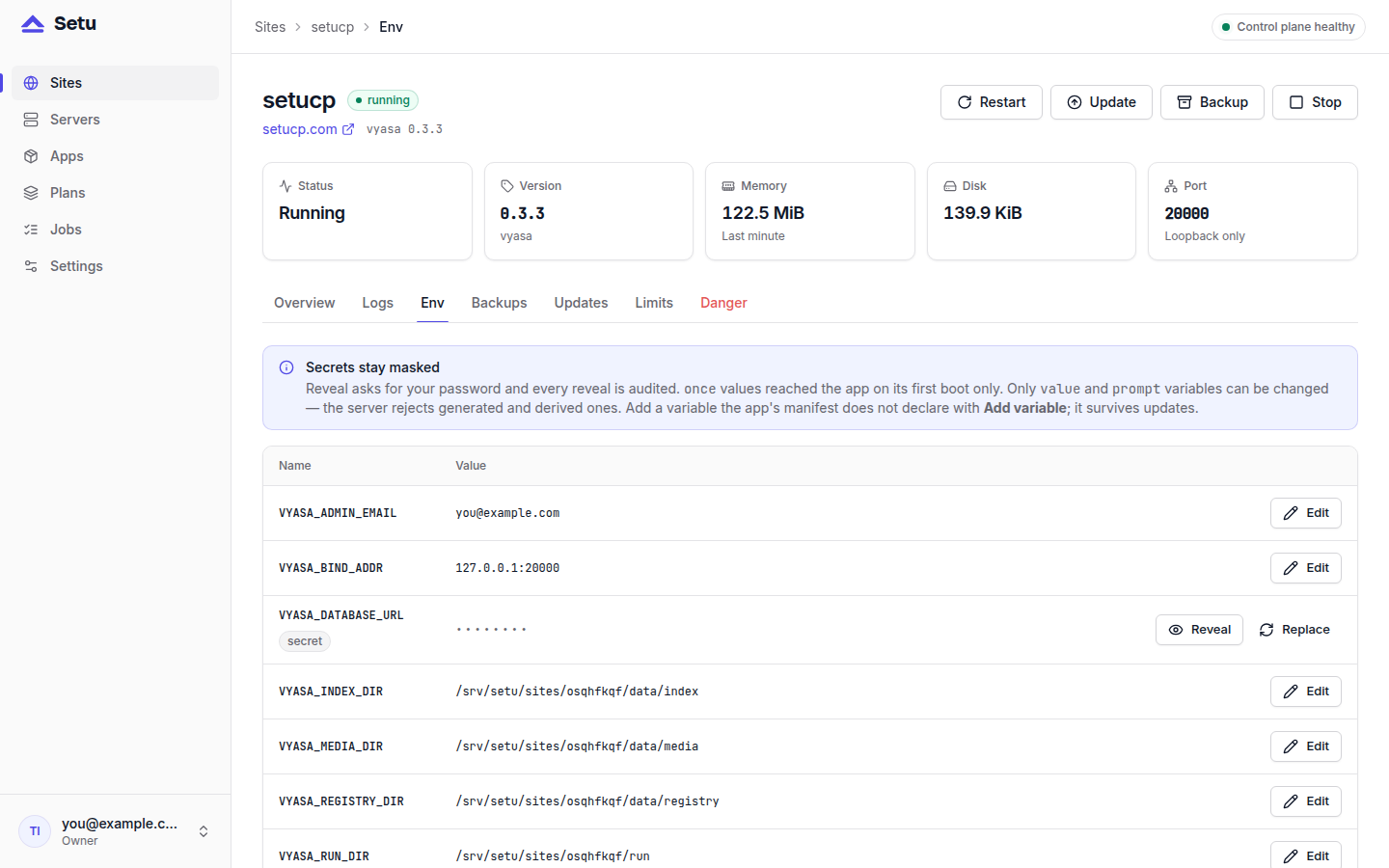
GET /sites/{id}/env masks every secret for every role, and any value sourced from postgres_url whatever its flag. The only way to read one is a reveal:
POST /api/v1/sites/{id}/env/{name}/reveal
{"password": "<your own password>"}
It needs the operator or owner role and the caller's own password. A wrong password is a 403 and counts toward the login rate limit. Every attempt is written to the audit log, as env.reveal or env.reveal_denied. Viewers never see a secret. This is how you read a new Vyasa site's one-time admin password: open the Env tab and reveal VYASA_ADMIN_PASSWORD.
Adding a variable the manifest did not plan for
Since Setu 0.1.4, the Env tab has Add variable. An extra variable has a name, a value and a Secret checkbox; a secret extra is sealed and masked like any other secret. Through the API, PUT /api/v1/sites/{id}/env takes extra (name to { value, secret }) and remove (a list of names).
The rules are strict on purpose:
- names match
^[A-Z_][A-Z0-9_]{0,127}$, at most 64 extras per site; - a name the manifest declares is refused, because the manifest always wins;
- reserved names are refused:
PATH,HOME,USER,LANGand similar, plus anything starting withLD_,SYSTEMD_,LISTEN_orSETU_.
Extras survive updates. If a later version starts declaring the same name, the manifest's rule takes over and the extra is dropped. Any env edit rewrites the env file and restarts a running site.
Keep the key that opens everything
Every sealed value depends on secret_key in /etc/setu/setu.toml. Lose that file and the sealed values cannot be opened; rotating the key is not supported yet. When you back up the control plane, copy the dump and setu.toml off the box together:
Treat setu.toml like a private key. The dump alone holds only v1: values, which are useless without it.
Next steps
The full rules are in the manifest reference and the security model. For why Setu seals values this way and who it protects against, read The Setu trust model.